🚀 Launches September 25 · 3-day free trial · 50% off for the first 250 · Get early access
MSM Connect
For Mac + iPhone · launching September 25

Your AI posts to TikTok, Instagram & Facebook. Your iPhone stays in the drawer.

Get early access · 3-day free trial, no card · 50% off for the first 250

I use:

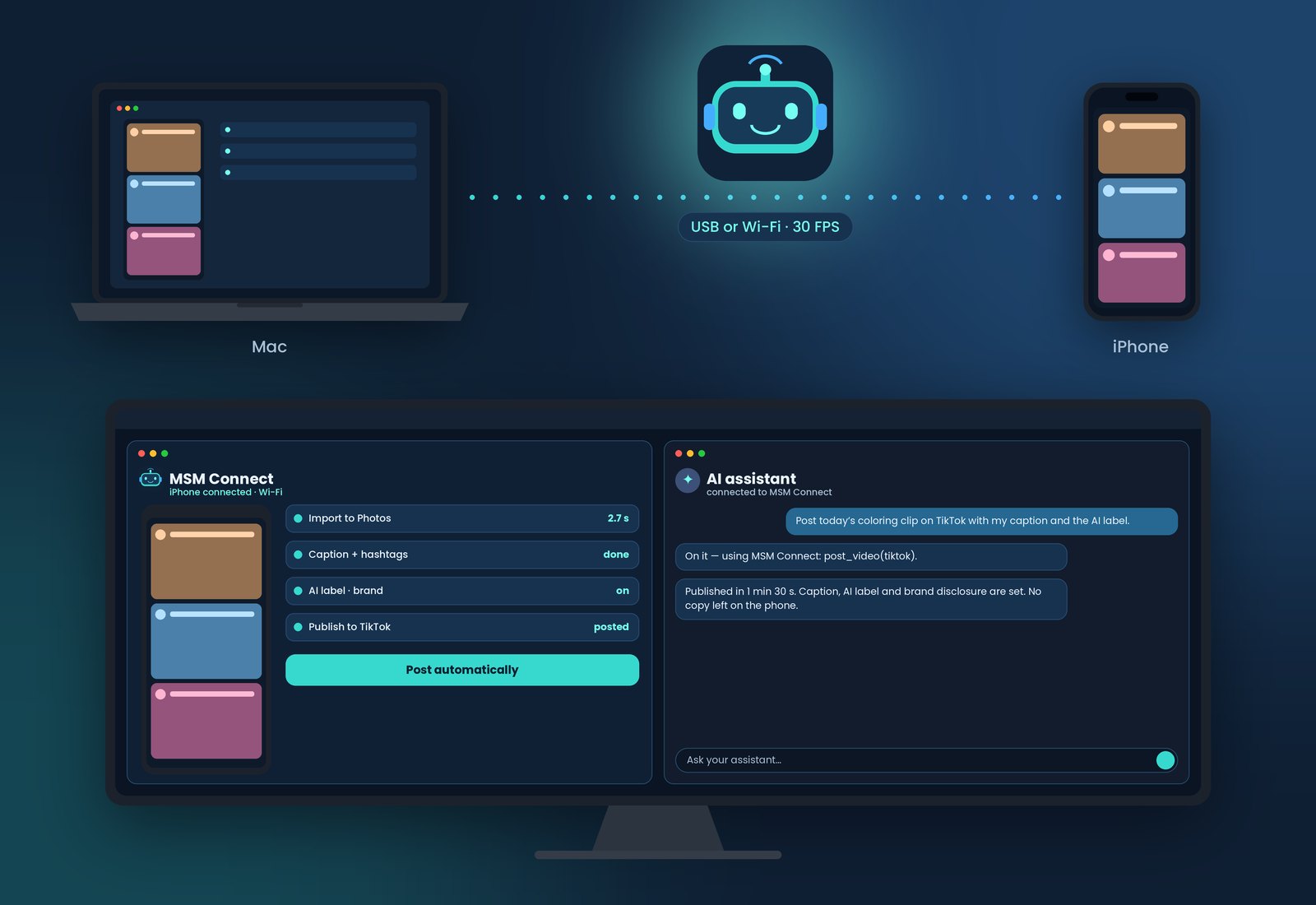
MSM Connect links your iPhone to your Mac. Your AI assistant writes the post, your Mac sends the clip to the phone and publishes it with tested recipes — while you make breakfast.

✓ No jailbreak✓ Runs locally, nothing on our servers✓ AI label & brand disclosure set for you

▶ 10 posts · 3 platforms · 1 morning — watch the 30-second story

A true story (sort of)

The best employees are the lazy ones.

He had to post hundreds of times a day, on every network. So he built MSM Connect: your AI makes the content, your Mac sends it to your iPhone, and the posting recipes publish it for you.

Get early access
MSM Connect: a Mac and an iPhone linked over Wi-Fi, with the MSM Connect app and an AI assistant side by side on a desktop screen

Everything you need to run content from one desk

Built for creators, small brands and social media teams who publish every day and don’t want to hold a phone to do it.

▣

Live mirroring & control

See your iPhone on your Mac and tap, swipe and type with mouse and keyboard — over USB or your local Wi-Fi.

⇪

Media straight to Photos

Drop images and videos on the Mac and they land in the iPhone Photos library in seconds. No cloud, no cables required.

✦

Automatic posting

Tested posting recipes write your caption, set the AI-generated and brand disclosure labels, and publish. TikTok today; Instagram, Facebook and YouTube next.

AI

Works with your AI assistant

A built-in connector and guide let assistants like Claude or ChatGPT post through MSM Connect’s recipes instead of guessing on screen.

☎

Polite standby

If you take a call or open another app mid-post, MSM Connect waits and continues when the phone is free — it never taps over you.

⚿

Private by design

Control runs locally between your Mac and iPhone. Your screen, media and accounts never pass through our servers.

Up and running in minutes

MSM Connect installs its iPhone component for you and keeps it renewed in the background.

Install on your Mac

Download MSM Connect and start your 3-day free trial.

Enable Developer Mode on your iPhone

On the iPhone open Settings → Privacy & Security → Developer Mode, turn it on and tap Restart. After the restart, tap Turn On. (Don’t see it? Plug the iPhone into your Mac once.) That’s the only setting you touch.

Install the iPhone component

Connect by cable once and press Install. Renewals happen automatically.

Connect & post

Go wireless, mirror your screen and let the recipes publish for you.

Simple pricing

Every Mac starts with a 3-day unlimited trial from the first phone connection. After that you keep a free hour every day, or upgrade.

Free

$0
after the 3-day trial
  • 1 hour of control per day
  • 1 iPhone
  • Mirroring, control, import
  • Automatic posting
Start free

Standard

$9.99 /mo
billed monthly · no yearly plan
  • 3 hours of control per day
  • 1 iPhone
  • Everything in Free
  • Email support
Choose Standard

Business

$49.99 /mo
billed monthly · or $348.99/year (save 41%)
  • Unlimited daily use
  • Up to 10 iPhones
  • Everything in Pro
  • Onboarding call
Choose Business

Founding offer · first 250 customers

50% off the first 3 months on monthly plans, or 50% off the first year on yearly plans (Pro $74.49, Business $174.49 for year one). Code FOUNDING50, valid September 25 – October 2, 2026, while the 250 spots last. Join the launch list to get the code first.

Prices in USD; EUR prices are the same amount in euro. Taxes are calculated at checkout by our payment partner. A license works on one Mac and can be moved to another at any time.

Requirements

Mac

  • Apple silicon or Intel Mac
  • Recent macOS with Xcode installed (free from the App Store)
  • Your own Apple ID (free or paid developer account)

iPhone

  • Recent iOS
  • Developer Mode turned on
  • Same Wi-Fi network as the Mac for wireless use

Recommended

  • Optional: a paid Apple Developer account renews the iPhone component yearly instead of weekly. Without one, MSM Connect renews it for you automatically every week and everything works just as well.
  • Full Photos access for the apps you post with
  • Do Not Disturb during scheduled posting

Downloads open on launch day, September 25. Get early access.

Get early access

MSM Connect launches on September 25, 2026. Join the list and we’ll email you the download link on launch day.

🍏 For Mac + iPhone only · macOS app · not available for Windows or Android
Your computer:

Questions

Does MSM Connect jailbreak or modify my iPhone?

No. It uses Apple’s developer tooling: a small companion component signed with your own Apple ID, installed and renewed by the Mac app. Turning off Developer Mode removes the ability to run it.

Why do I need Developer Mode?

iOS only allows apps that control the screen to run when Developer Mode is enabled. It is a standard Apple setting and can be turned off at any time.

Which platforms can it post to automatically?

TikTok today. Instagram, Facebook and YouTube recipes are in progress. You can always control any app manually from your Mac.

Can I use my own AI assistant?

Yes. MSM Connect includes a connector and a guide for assistants such as Claude or ChatGPT. Assistants post through our tested recipes; results of actions they take outside those tools depend on the assistant and your instructions.

What happens when the trial ends?

You keep 1 hour of control per day for free. Upgrade any time to get more hours or unlimited use.

Is my data sent to your servers?

No screen content, media or social accounts are sent to us. Our license server only receives an anonymous Mac identifier, your license key and daily usage time.

How do refunds work?

See our refund policy. If MSM Connect doesn’t work with your setup, contact us and we’ll make it right.